Lock and unlock the car
|
Warning
|
There are several ways to lock and unlock the car, from outside and inside the car. Make sure the door handle is free from snow and ice before unlocking the car. Additionally, the car will automatically lock the doors once it is driving faster than 7 km/h.
From the outside, the car can be locked and unlocked using:
| • | NFC card |
| • | Digital key |
| • | The key fob |
| • | The capacitive switch on the door handle |
From the inside, the car can be locked and unlocked using the center display.
When unlocking the car from the outside, the indicator lights flash twice, the door handles pop out, and the side mirrors unfold if the function folding mirrors on lock is activated. The doors will automatically lock again if they are not opened within 2 minutes.
When locking the car from the outside, the indicator lights flash once, the door handles unfold, and the side mirrors fold in if the function folding mirrors on lock is activated. If the function close windows on lock is activated, any open window will close when the car is locked. To activate/deactivate closing windows on lock:
| 1. |
Navigate to  . .
|
| 2. |
Toggle Close windows on lock on/off.
|
If it is necessary to leave a person or pet in the car for a few minutes with the car locked, the internal motion sensor must be disabled, or the alarm will be triggered. See Reduced guard mode.
In very cold weather, the side mirrors might not fold/unfold properly.
We recommend:
Disable the automatic fold/unfold of the side mirrors when expecting temperatures below −20°C, either by navigating to, or by doing the following:
Disable the automatic fold/unfold of the side mirrors when expecting temperatures below −20°C, either by navigating to
, or by doing the following:
| 1. |
Open the swipe-down menu.
|
| 2. | Press Side mirrors position. |
It is always the driver's responsibility to make sure that the car is locked when leaving it, even if walk-away lock is enabled.
Note: If you do not get a locking confirmation from the car, make sure all doors are fully closed, as it is not possible to lock the car with an open door. If the hood or the tailgate is open, the doors are locked, and the hood and/or the tailgate are locked upon closing.
Note: Locking/unlocking the car several times within a short period of time will temporarily disable the automatic pop out/retraction of the door handles and the folding/unfolding of the side mirrors.
Lock and unlock the car using the NFC card
|
NOTICE
|
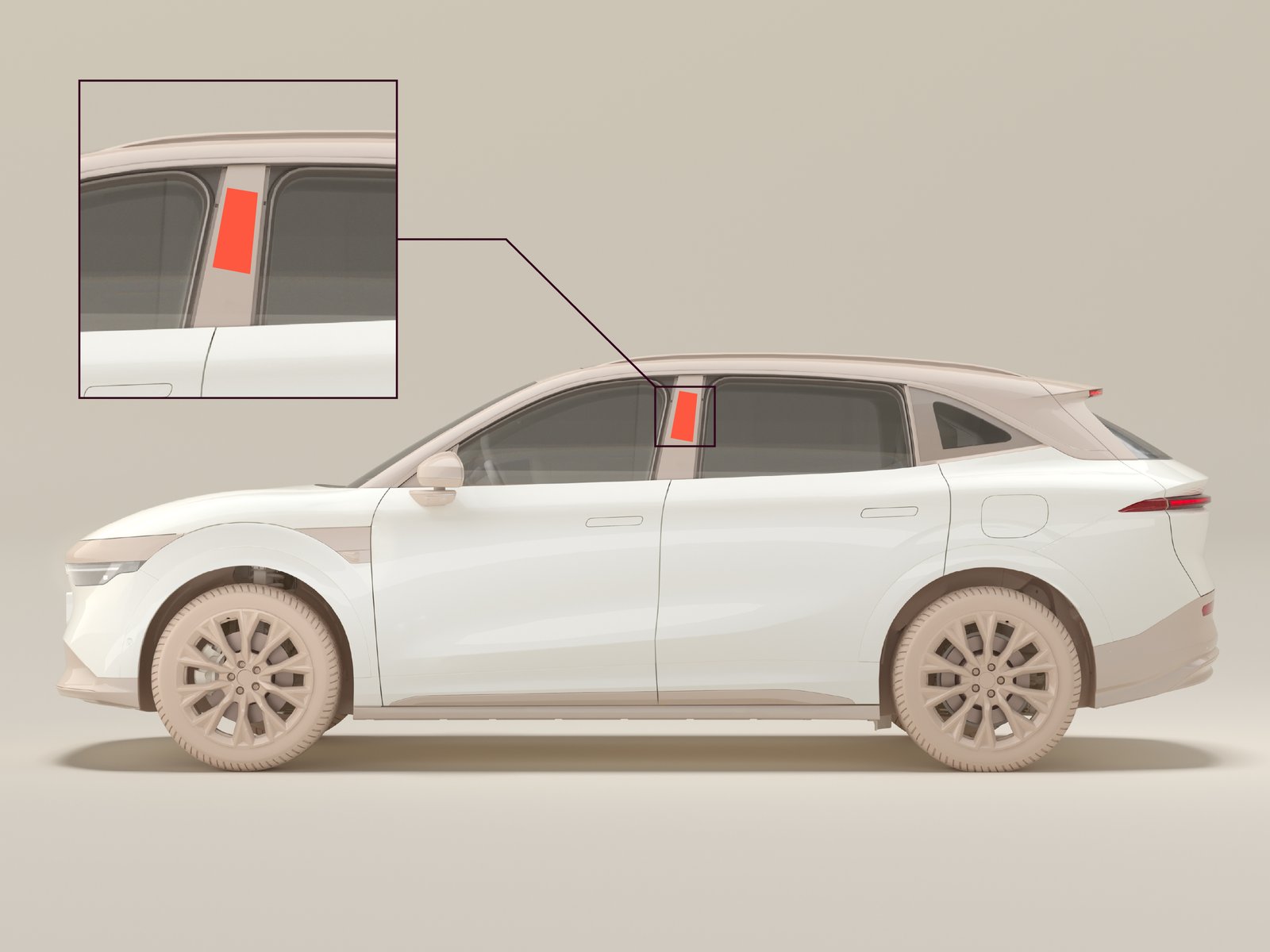
Tap the NFC card against the key induction area on the center pillar to lock or unlock all the doors. When the car is locked, the NFC card can be held for two seconds over the key induction area to automatically close all open windows. When the car is unlocked, the NFC card can be swiped, for four seconds, along the key induction area to open all closed windows. Place the NFC card on the wireless charging pad to allow the car to be started. Remove it from there once the car is started.
Read more about setting up and acquiring NFC cards in the Zeekr app section.
Use the key fob
The key fob has different buttons, each of which have different functions depending on how they are pressed.
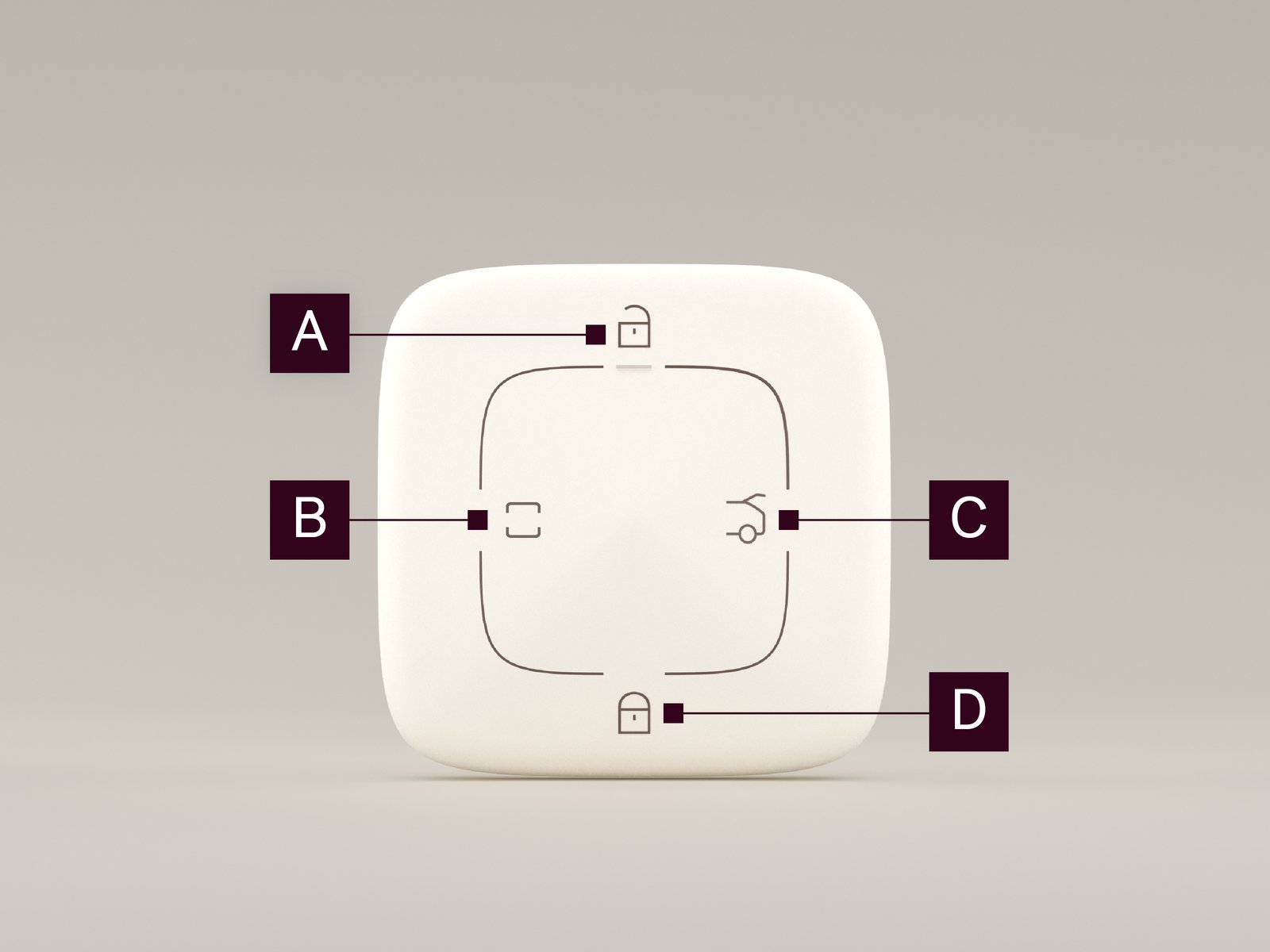
| Button | Click | Double click – 1 second | Long press – 2 seconds |

|
Unlock all doors and charging port. If two-step unlocking is activated, only the driver door and charging port are unlocked. | Open all windows. | |

|
Release the front hood latch. | ||

|
Stop opening/closing the tailgate. | Open/close tailgate. | |

|
Lock the car. | Car search mode. Lights only or lights and sounds.1 | Close all windows. |
1Depending on which exterior feedback is selected for locking/unlocking the car.
The key fob can also lock/unlock and start the car in the same way as the NFC card. Tap the key fob against the key induction area on the center pillar to lock or unlock the doors. Place the key fob on the wireless charging pad to allow the car to be started. Remove it from there once the car is started.
Keyless functions
The key fob has several automatic "keyless" functions besides the buttons on the key fob:
| Keyless unlock | Unlock the doors and tailgate if the door handle or tailgate button is touched, with the key fob within 2-3 meters of the car. |
| Keyless start | Start the car if the driver applies the brake and shifts to D, with the key fob inside the car. |
| Approach light (requires activating approach light in the center display) | Activate the low beams for 30 seconds when the key fob is approaching the car, 8-15 meters away. Triggers only once per locking cycle, and only when the car is locked and not in D. |
| Approach unlock (requires activating approach unlock in the center display) |
Unlock the car when the key fob is approaching the car, 1.5–3.5 meters away.
|
| Walk-away lock (requires activating walk-away lock in the center display) | Lock the car when the key fob is leaving the car, approximately 6 meters away. |
Lock/unlock the car using digital key
To lock and unlock the doors remotely through the Zeekr app:
| • | On the car page. |
| • | By navigating to  . . |
Certain phones support ultra wideband digital keys. To lock and unlock the doors remotely with an ultra wideband digital key, use the digital key through your wallet app.
Thanks to increased distance measuring precision, ultra wideband digital keys support approach unlock/walk-away lock. Other digital keys do not support this function.
Note: Ultra wideband digital keys are currently restricted to iPhone models with ultra wideband capabilities. Confirm with your device manufacturer if your phone supports ultra wideband.
To start the car with a digital key, put the phone on the wireless charging pad.
Note: Starting the car with a digital key only works if a Bluetooth connection is established between the phone and the car. For more information, see Digital key.
Unlock the car using the buttons on the driver door console
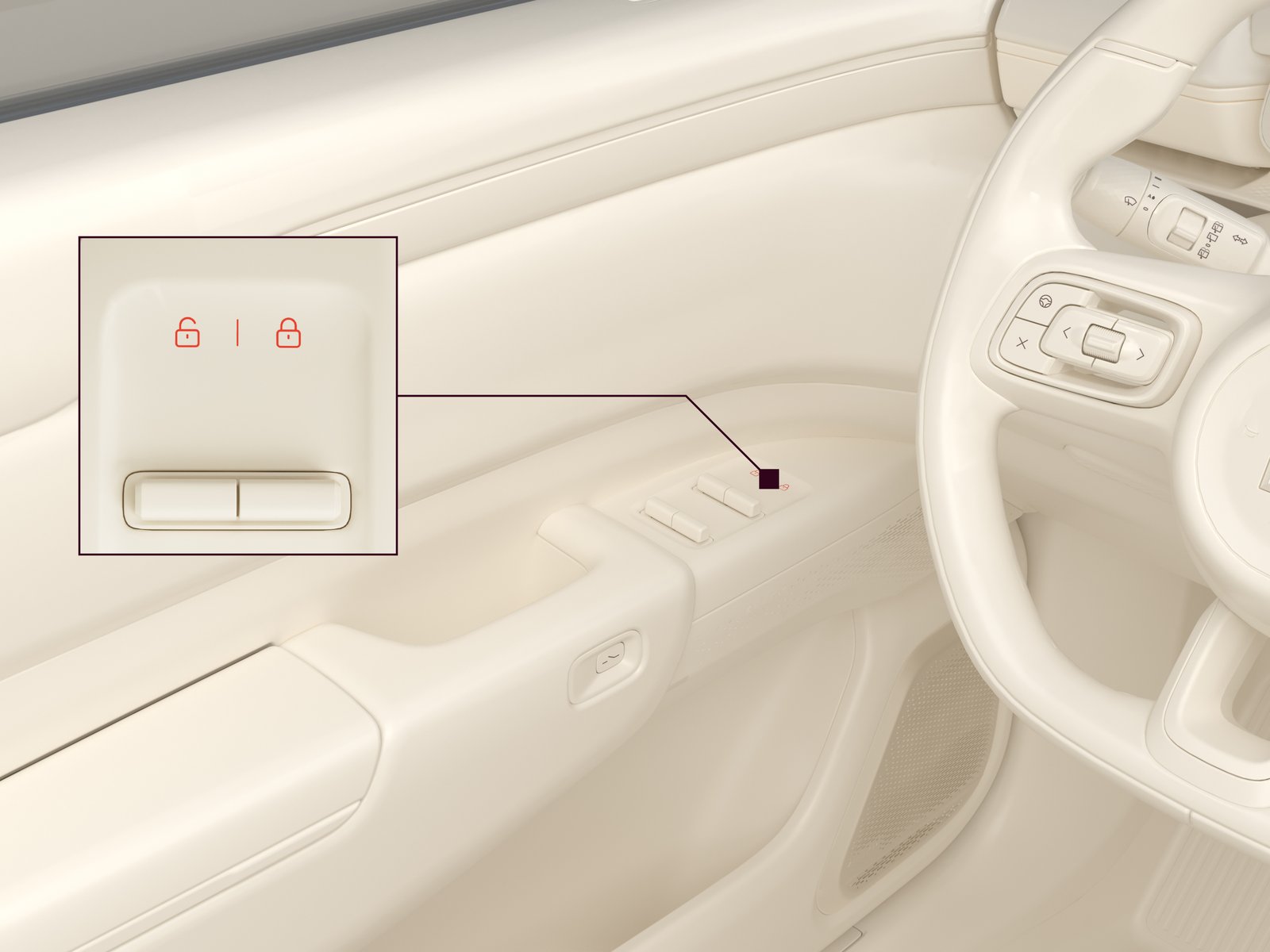
The doors and windows can be controlled with the buttons on the driver door console.
| 1. |
Press  to lock the doors and the tailgate. to lock the doors and the tailgate.
|
| 2. |
Press  to unlock the doors and the tailgate. to unlock the doors and the tailgate.
|
Lock/unlock from the center display
To lock/unlock the doors through the center display, press  /
/ in the upper left of the center display.
/in the upper left of the center display.
Lock/unlock the door with the capacitive switch (non electric doors)
When the unlock on approach function is not enabled or is malfunctioning, the car can be unlocked if the user touches the door unlock switch on the front door handle if they have the key fob or digital key with them.
Child locks
The child locks prevent passengers from opening either or both rear doors. When the child lock is enabled, the rear doors can only be opened through the center display or the outer door handles.
If a passenger in the rear seat tries to open the door while the child lock is enabled, a pop-up appears on the center display indicating which door a passenger tried to open. In the pop-up, the driver can choose one of the following actions:
| • | Temp. unlock disables the child lock on the door until the car starts driving. |
| • | Unlock unlocks the door once. |
| • | Do not unlock and ignore keeps the door locked. |
To activate the child locks for either or both rear doors:
| 1. |
Navigate to .
|
| 2. | Scroll to Child lock. |
Child lock activation is indicated by these symbols for the left side  and right side
and right side
Reduced guard mode
Reduced guard mode is used to disable the internal motion sensor, the movement and tilt detectors, and double lock. It is usually used for two reasons:
| • | If it is necessary to leave a person or pet in the car for a few minutes with the car locked. |
| • | If the car is going to travel by ferry, or another transport mode where there will be a lot of movement. |
If reduced guard mode is not activated during these situations, the alarm will be triggered. SeeLife presence detection. Pay attention to your surroundings, and never leave anyone in the car in situations where it might quickly become hot inside the car. Activate reduced guard mode before locking the car, by navigating to in the center display. Reduced guard mode will automatically be disabled after the car is unlocked and must be enabled again each time it is needed.
in the center display. Reduced guard mode will automatically be disabled after the car is unlocked and must be enabled again each time it is needed.
If a person or animal is going to be left in the car while the car is locked, activate reduced guard mode and deactivate life presence detection.
Two-step unlocking
When two-step unlocking is activated, pressing the unlock button once on the key fob or digital key unlocks the driver door. If two-step unlocking is deactivated, pressing the unlock button once unlocks all doors.
To activate two-step unlocking:
| 1. |
Navigate to .
|
| 2. |
Select Driver door under Unlock with key fob.
|
| 3. | Toggle Unlock on park on. |
Life presence detection
Life presence detection is a safety function that protects people or animals in the car from dangerous situations that can occur when alone in a locked car, such as high temperatures. If there is a fault with the function, this symbol  is shown on the driver display.
is shown on the driver display.
If a person or animal is detected in the rear seat of the car after the car has been locked, the alarm system triggers, flashing the hazard warning lights, and sending notifications to the user's phone. If a person or animal is still detected after five seconds have passed, the alarm is escalated and remains active until disarmed. If the temperature in the car is over 35°C, the air conditioner is enabled with the temperature set to 22°C.
Life presence detection is activated by default. Whenever it is deactivated, it is reactivated if the car enters driving mode.
If a person or animal is going to be left in the car while the car is locked, activate parking comfort mode before leaving the car. For more information, see Parking comfort.
Life presence detection automatically enters detection mode if all the following conditions are met:
| • | Life presence detection is activated |
| • | All doors, the tailgate, and the hood are closed, and the car is locked from the outside |
| • | Parking comfort is not activated |
To disarm an active life presence detection alarm:
| 1. |
Unlock the car.
|
| 2. |
Open any door.
|
Note: During an active life presence detection alarm, the air conditioner cannot be disabled through the Zeekr app.
To activate/deactivate life presence detection:
| 1. |
Navigate to .
|
| 2. |
Press Life presence detection.
|
| 3. |
Press OK to confirm.
|
The following modes deactivate life presence detection when they are activated:
| • | Pet mode |
| • | Car wash mode |
| • | Parking comfort mode |
| • | Rest mode |
| • | Camping mode |
If life presence detection is activated when activating one of these modes, a notification pop-up appears on the center display.
Note: Deactivating these modes does not reactivate life presence detection. Life presence detection must be manually reactivated. Life presence detection is also reactivated if the car enters driving mode.
Unlock with parking (P) gear
When Unlock with Parking (P) gear is enabled and the car is locked, the car can be unlocked by entering P.
To activate Unlock with parking (P) gear:
| 1. |
Navigate to .
|
| 2. |
Toggle Unlock on park on.
|